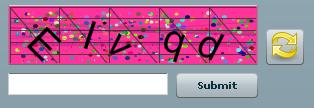
1) Create a flex project - 'mycaptcha'
2) create a module - 'CCaptcha.mxml'
3) create a canvas inside CCaptcha.mxml
4) create a folder inside the project and name it as "Fonts"
5) copy some font files(.ttf file) inside Font folder
it is better to use entirely different font styles, like ( arial, comic, Impact ,etc)
6) Create a style tag inside the ccaptcha.mxml module
@font-face { src:url("../Font/arial.ttf"); fontFamily: arial; } @font-face { src:url("../Font/arial.ttf"); fontFamily: Fear; } @font-face { src:url("../Font/comic.ttf"); fontFamily: comic; } @font-face { src:url("../Font/Impact .ttf"); fontFamily: Impact ; }
7) create 5 label box , and Fill each label with random charachter
8) add the labels inside canvas object
9) create some line object with random x,y coordinate and add inside the canvas , like line object you can use circle , polygon
you can use this module inside your project by adding it from "custom" components view
Sample Code :
<?xml version="1.0" encoding="utf-8"?>
<mx:Module xmlns:mx="http://www.adobe.com/2006/mxml" layout="absolute"  initialize="init();" width="250" height="60">
   <mx:Canvas x="0" y="0" width="250" height="60" backgroundColor="#FFFFFF" id="CaptchaCanvas" borderStyle="outset">
   </mx:Canvas>
   <mx:Style>
      @font-face {
        src:url("../Font/ka1.ttf");
        fontFamily: ka1;
     }
     @font-face {
        src:url("../Font/Fear.ttf");
        fontFamily: Fear;
     }
   @font-face {
       src:url("../Font/DimWitRight.ttf");
       fontFamily: DimWitRight;
   }
   @font-face {
       src:url("../Font/CornFed.ttf");
       fontFamily: CornFed;
   }
   @font-face {
       src:url("../Font/Backto1982.ttf");
       fontFamily: Abbeyline;
   }
   @font-face {
       src:url("../Font/Abbeyline.ttf");
       fontFamily: Backto1982;
   }
   @font-face {
       src:url("../Font/Advert-Regular.ttf");
       fontFamily: AdvertRegular;
   }
   @font-face {
       src:url("../Font/AeroviasBrasilNF.ttf");
       fontFamily: AeroviasBrasilNF;
   }
   @font-face {
       src:url("../Font/arial.ttf");
       fontFamily: Arial;
   }
   </mx:Style>
   <mx:Script>
       <![CDATA[
           import mx.formatters.SwitchSymbolFormatter;
           import flash.sampler.NewObjectSample;
           import mx.effects.Rotate;
           import flash.net.sendToURL;
           import mx.controls.Alert;
           import mx.controls.Label;
           import mx.core.UIComponent;
           import mx.core.UIComponent;
           import flash.geom.ColorTransform;

           private var CAPTCHA_WIDTH:Number;
           private var CAPTCHA_HEIGHT:Number;
           private var alphaU:String="ABCDEFGHIJKLMNOPQRSTUVWXYZ";
           public var alphaUpper:Boolean=true;
           public var alphaLower:Boolean=true;
           public var numbers:Boolean=false;
           public var specialChar:Boolean=false;
           private var alphaL:String="abcdefghijklmnopqrstuvwxyz";
           private var numeric:String="0123456789";
           private var specialC:String="@#$%&*?";
           private var randomSource:String;
           public var code:String;
           public var caseSensitive:Boolean=false;
           public var hLine:Boolean=true;
           public var vLine:Boolean=true;
           public var dots:Boolean=true;
           public var randomBGColor:Boolean=true;
           public var backColor:String="0xFFFFFF";

           //DOTS
           public var DOTS_COUNT:Number=500;

           //TEXT
           public var fontface:Array = new Array("ka1", "Fear", "DimWitRight", "CornFed", "Abbeyline", "Backto1982", "ActionIs", "AdvertRegular", "AeroviasBrasilNF","Arial");

           public var LINE_COLOR_ARRAY:Array = new Array("0x000066","0x006666","0x660000","0x006600","0x660066","0x663366","0x666066");
           public var BACK_COLOR_ARRAY:Array = new Array("0x357EC7","0x9172EC","0xF778A1","0xB93B8F","0x817679","0x999900","0xFF3399");

           public var CHAR_MINSPACE:int;
           public var CHAR_MIN_Y:int;
           public var CODE_LENGHT:int=5;

           private function init():void{
               CAPTCHA_WIDTH=CaptchaCanvas.width;
               CAPTCHA_HEIGHT=CaptchaCanvas.height;
               CHAR_MIN_Y=12;
               //DOTS_COUNT=500;
               CHAR_MINSPACE=40;
               //CODE_LENGHT=5;
               CaptchaCanvas.verticalScrollPolicy="off";
               CaptchaCanvas.horizontalScrollPolicy="off";
           }

           private function drowHline(maxLnwidth:int, colorArray:Array, maxLnAlpha:Number, LnCount:int, canvas:UIComponent){
               var line:Sprite = new Sprite();
               var lcount:int;
               var c1:UIComponent = new UIComponent();
               for(lcount=0;lcount<LnCount;lcount++){
                   line.graphics.lineStyle(Math.random()*maxLnwidth, LINE_COLOR_ARRAY[Math.ceil(Math.random()*LINE_COLOR_ARRAY.length -1 )], maxLnAlpha);
                   line.graphics.moveTo(1,Math.random()*CAPTCHA_HEIGHT);
                   line.graphics.lineTo(CAPTCHA_WIDTH,Math.random()*CAPTCHA_HEIGHT);
               }
               c1.addChild(line);
               CaptchaCanvas.addChild(c1);
           }
           public function generateCaptcha():void{
               ClearCanvas();

               if(dots)
                   generateDots(CaptchaCanvas);
               if(vLine)
                   drawLines(0, 0, (CAPTCHA_WIDTH)-1, (CAPTCHA_HEIGHT)-1, 5, 5,CaptchaCanvas);
               if(hLine)
                   drowHline(5,LINE_COLOR_ARRAY,.2,5,CaptchaCanvas);
               if(randomBGColor)
                   CaptchaCanvas.setStyle("backgroundColor",BACK_COLOR_ARRAY[Math.ceil(Math.random() * BACK_COLOR_ARRAY.length - 1)].toString());
               else
                   CaptchaCanvas.setStyle("backgroundColor",backColor.toString());

               var chr1:Label = new Label();
               var chr2:Label = new Label();
               var chr3:Label = new Label();
               var chr4:Label = new Label();
               var chr5:Label = new Label();

               randomSource="";
               if(alphaUpper)
                   randomSource=randomSource+alphaU;
               if(alphaLower)
                   randomSource=randomSource+alphaL;
               if(numbers)
                   randomSource=randomSource+numeric;
               if(specialChar)
                   randomSource=randomSource+specialC;
               if(randomSource.length<5)
                   randomSource=alphaL+alphaU;

               code=randomSource.charAt(Math.ceil(Math.random()*randomSource.length-1)) +
                       randomSource.charAt(Math.ceil(Math.random()*randomSource.length-1)) +
                       randomSource.charAt(Math.ceil(Math.random()*randomSource.length-1)) +
                       randomSource.charAt(Math.ceil(Math.random()*randomSource.length-1)) +
                       randomSource.charAt(Math.ceil(Math.random()*randomSource.length-1));

               chr1.text=code.charAt(0);
               chr1.x=40;
               chr1.y=Math.random() * CHAR_MIN_Y;
               chr1.rotation = Math.random() * 50;
                  chr1.setStyle("fontFamily",fontface[9].toString());
               chr1.setStyle("color","#000000");
               chr1.setStyle("fontSize","40");
               CaptchaCanvas.addChild(chr1);

               chr2.text=code.charAt(1);
               chr2.x=chr1.x + CHAR_MINSPACE;
               chr2.y=Math.random() * CHAR_MIN_Y;
               chr2.rotation = Math.random() * 50;
               chr2.setStyle("color","#000000");
               chr2.setStyle("fontSize","40");
               chr2.setStyle("fontFamily",fontface[9].toString());
               CaptchaCanvas.addChild(chr2);

               if(CODE_LENGHT>=3){
                   chr3.text=code.charAt(2);
                   chr3.x=chr2.x + CHAR_MINSPACE;
                   chr3.y=Math.random() * CHAR_MIN_Y;
                   chr3.rotation = Math.random() * 50;
                   chr3.setStyle("color","#000000");
                   chr3.setStyle("fontSize","40");
                   chr3.setStyle("fontFamily",fontface[9].toString());
                   CaptchaCanvas.addChild(chr3);
               }

               if(CODE_LENGHT>=4){
                   chr4.text=code.charAt(3);
                   chr4.x=chr3.x+CHAR_MINSPACE;
                   chr4.y=Math.random() * CHAR_MIN_Y;
                   chr4.rotation = Math.random() * 50;
                   chr4.setStyle("color","#000000");
                   chr4.setStyle("fontSize","40");
                   chr4.setStyle("fontFamily",fontface[9].toString());
                   CaptchaCanvas.addChild(chr4);
               }

               if(CODE_LENGHT>=5){
                   chr5.text=code.charAt(4);
                   chr5.x=chr4.x+CHAR_MINSPACE;
                   chr5.y=Math.random() * CHAR_MIN_Y;
                   chr5.rotation = Math.random() * 50;
                   chr5.setStyle("color","#000000");
                   chr5.setStyle("fontSize","40");
                   chr5.setStyle("fontFamily",fontface[9].toString());
                   CaptchaCanvas.addChild(chr5);
               }
           }

           private function generateDots(canvas:UIComponent):void
           {
                for (var a:int=0; a < DOTS_COUNT; a++) {
                    var tmpComponent:UIComponent = new UIComponent();
                    var X:int = Math.ceil(Math.random()* (CAPTCHA_WIDTH-10))+5;
                    var Y:int = Math.ceil(Math.random()* (CAPTCHA_HEIGHT-10))+5;
                    tmpComponent.graphics.lineStyle(Math.floor(Math.random()*5),
                                         RGBToHex(Math.floor(Math.random()*255),
                                                           Math.floor(Math.random()*255),
                                                           Math.floor(Math.random()*255)),
                                         100);
                    tmpComponent.graphics.moveTo(X, Y);
                    tmpComponent.graphics.lineTo(X+1, Y);
                    canvas.addChild(tmpComponent);
                }
           }
           private function RGBToHex (r:uint, g:uint, b:uint):uint {
                var hex:uint = r << 16 ^ g << 8 ^ b;
                return hex;
           }

           private function ClearCanvas():void{
               CaptchaCanvas.removeAllChildren();
           }

           private function generatePolys(no:uint,canvas:UIComponent):void{
                for (var i:uint = 0; i < no; i++) {
                    var tmpComponent:UIComponent = new UIComponent();
                    var tmpRadius:int = Math.floor(Math.random()*40)+10;
                    tmpComponent = generateOnePoly(Math.floor(Math.random()*6)+3, tmpRadius,
                                          RGBToHex(Math.floor(Math.random()*255),
                                                             Math.floor(Math.random()*255),
                                                             Math.floor(Math.random()*255)));
                    tmpComponent.x = Math.floor(Math.random()*CAPTCHA_WIDTH);
                    tmpComponent.y = Math.floor(Math.random()*CAPTCHA_HEIGHT);
                    tmpComponent.rotation = Math.floor(Math.random()*360);
                    tmpComponent.alpha = 0.3;
                    canvas.addChild(tmpComponent);
                   }
           }

           private function generateOnePoly(sides:uint, radius:uint, color:uint):UIComponent {
               var tmpCmp:UIComponent = new UIComponent();
                var DSides:uint = Math.floor(360/sides);
                   //Highest transparency is 100 - default is 50
                tmpCmp.graphics.beginFill(color, 50);
                var cnt:int = -1;

                while (++cnt < sides) {
                    var X:int = Math.floor(radius*Math.sin(DSides*cnt/180*Math.PI));
                    var Y:int = Math.floor(radius*Math.cos(DSides*cnt/180*Math.PI));
                    if (!cnt) {
                        tmpCmp.graphics.moveTo(X, Y);
                    } else {
                        tmpCmp.graphics.lineTo(X, Y);
                    }
                   }
                return tmpCmp;
           }

           private function drawLines(x:int, y:int, wi:int, hi:int, r:int, c:int, canvas:UIComponent):void {
            var tmpComponent:UIComponent = new UIComponent();
               tmpComponent.graphics.lineStyle(1, 0x333333, .8);
               var i:int = 0;
               var xd:Number = wi/c;
               var yd:Number = hi/r;
                  for (i=0; i<= r; i++) {
                   var yy:Number = y+i*yd;
                   tmpComponent.graphics.moveTo(x+wi, yy);
                   tmpComponent.graphics.lineTo(x, yy);
               }
                for (var j:int=0; j < c; j++) {
                   var xx:Number = x+j*xd;
                   tmpComponent.graphics.lineTo(xx, y);
                   tmpComponent.graphics.lineTo(xx+xd, y+hi);
               }
               tmpComponent.graphics.lineTo(x+wi, y);
               canvas.addChild(tmpComponent);
           }
    public function checkcaptcha(targetCode:String):Boolean{
               if(targetCode.length<2)
                   return false;
               if(caseSensitive){
                   if(code.substr(0,CODE_LENGHT)== targetCode.substr(0,CODE_LENGHT))
                       return true;
                   else
                       return false;
               }
               else{
                   if(code.substr(0,CODE_LENGHT).toLocaleLowerCase()== targetCode.substr(0,CODE_LENGHT).toLocaleLowerCase())
                       return true;
                   else
                       return false;
               }
           }
            private function radiansToDegrees(radians:Number):Number {
                var degrees:Number = radians * (180 / Math.PI);
                return degrees;
            }
            private function degreesToRadians(degrees:Number):Number {
                var radians:Number = degrees * (Math.PI / 180);
                return radians;
            }
]]>
   </mx:Script>
</mx:Module>
ScreenShot: